1. INTERFACE SWITCH ACCESS
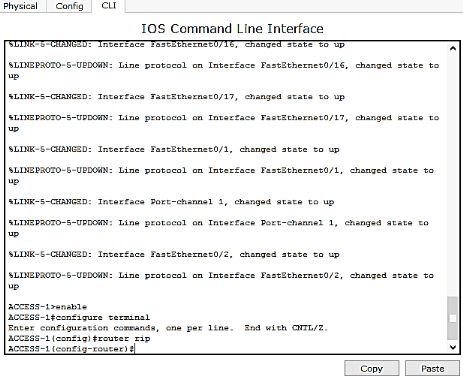
Figure 4.8: SwitchAccess
2. INTERFACE SWITCH DISTRIBUTEUR
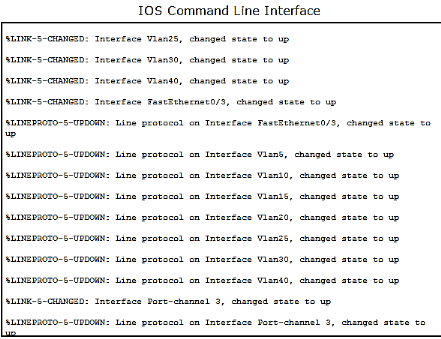
Figure 4.9: Switchdistributeur
3. INTERFACE SWITCH COEUR

Figure 4.10: Switchcoeur
4. INTERFACE ACCESS POINT
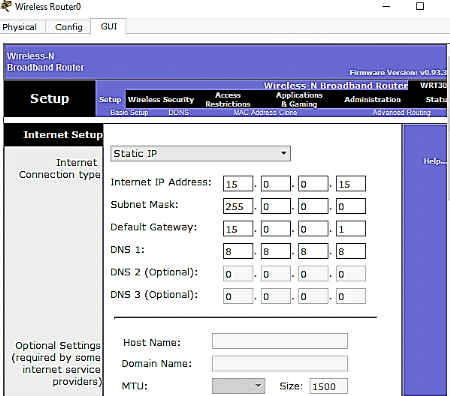
Figure 4.11: Interface Access point
Dans la configuration de ce point d'accès nous avons
réalisé ces opérations :
- Donner le nom du réseau wifi CARITAS-Kga
- Le mot de passe du wifi est Caritas2019
- L'adresse du réseau WIFI est 192.168.10.0 /24
- Les ordinateurs qui seront connectés au réseau
wifi obtiendront les adresses automatiquement.
5. INTERFACE SERVEUR

Figure 4.12: Configuration Serveur
D'une manière générale, les deux pages
web suivantes nous donnent une lumière par rapport à
l'accès de chaque utilisateur voulant se connecter au serveur web en
tapant cette adresse : wwwcaritaskga.com
6. PAGE D'ACCUEILLE
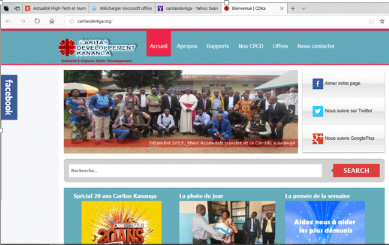
Figure : 4.13 : page web d'accueille
7. PAGE NOS CONTACTS
 
Figure : 4.14 : page web Nos contacts
4.6 PLAN D'ADRESSAGE
Notre plan d'adressage se présente de la manière
suivante :
Tableau 4.2 : plan d'adressage de vlan
|
VLAN
|
ADRESSE RESEAU
|
IP DISTRIBUTERU-1
|
IP DISTRIBUTEUR-2
|
|
FINANCE
|
192.168.5.0/24
|
15.0.0.0
|
192.168.10.14
|
|
BDD
|
192.168.10.0/24
|
172.16.0.0
|
192.168.20.0
|
|
BDOM
|
15.0.0.0/24
|
192.168.10.0
|
192.168.30.0
|
|
BDC
|
192.168.20.0/24
|
192.168.20.0
|
192.168.40.0
|
|
GESTION
|
192.168.40.0/24
|
192.168.20.0
|
172.16.0.0
|
|
INFORMATIQUE
|
192.168.30.0/24
|
|
|
|
ADMINISTRATION
|
192.168.25.0/24
|
|
|
CONFIGURATION HSRP
Tableau 4. 3 : plan d'adressage de HSRP
|
RESEAU
|
IP VIRTUEL
|
IP ACTIF
|
IP EN VEILLE
|
|
192.168.0.32
|
192.168.0.34
|
192.168.0.33
|
192.168.0.46
|
|
192.168.0.64
|
192.168.0.66
|
192.168.0.78
|
192.168.0.65
|
Source : concepteur
4.4 EXTRAIT DES COMMANDES
1. Code des Vlans
Vlan 5
nameVlan_finance
vlan10
nameVlan_bdd
vlan 20
nameVlan_Bdc
vlan 15
nameVlan_Bdom
vlan 40
nameVlan_Gestion
vlan 30
name Vlan-Informatique
vlan 25
name Vlan-Administration
2. CONFIGURATION DE HOSTNAME
switch#conf t
switch(config)# hostname SW-Coeur1
SW-Coeur1(config)#
3. CONFIGURATION D'ACCES A DISTANCE (TELNET)
SW-Coeur1(config)#username pfe privilege 15 password
pfe
SW-Coeur1(config)#line con 0
SW-Coeur1(config)#line vty 0 4
SW-Coeur1(config)# login local
4. CONFIGURATION DES SWITCH DISTRIBUTEURS
DISTRIBUTION-2>enable
DISTRIBUTION-2#vlan database
% Warning: It is recommended to configure VLAN from config
mode,
as VLAN database mode is being deprecated. Please consult user
documentation for configuring VTP/VLAN in config mode.
DISTRIBUTION-2(vlan)#
5. CONFIGURATION DES INTERFACES VLANS
SW-Coeur1(config)#interface vlan5
SW-Coeur1(config-if)#ip address 192.168.20.0
255.255.255.0
SW-Coeur1(config-if)# exit
SW-Coeur1(config)# interface vlan10
SW-Coeur1(config-if)#ip address 192.168.10.0
255.255.255.0
SW-Coeur1(config-if)# exit
SW-Coeur1(config)# interface vlan15
SW-Coeur1(config-if)#name Vlan-15
SW-Coeur1(config-if)#ip address 172.168.15.0
255.255.255.0
SW-Coeur1(config-if)# exit
6. CONFIGURATION DE HOSTNAME
switch#conf t
switch(config)# hostname SW-Coeur1
SW-Coeur1(config)#
7. CONFIGURATION DU SWITCH COEUR DU REAU
COEUR-DU-RESEAU>enable
COEUR-DU-RESEAU#configure terminal
Enter configuration commands, one per line. End with CNTL/Z.
COEUR-DU-RESEAU(config)#router rip
COEUR-DU-RESEAU(config-router)#
COEUR-DU-RESEAU(config-router)#exit
COEUR-DU-RESEAU(config)#
COEUR-DU-RESEAU(config)#router rip
COEUR-DU-RESEAU(config-router)#
8. CONFIGURATION DE HSRP
%LINK-5-CHANGED: Interface Vlan5, changed state to down
%LINK-5-CHANGED: Interface Vlan10, changed state to down
%LINK-5-CHANGED: Interface Vlan15, changed state to down
%LINK-5-CHANGED: Interface Vlan20, changed state to down
%LINK-5-CHANGED: Interface Vlan25, changed state to down
%LINK-5-CHANGED: Interface Vlan30, changed state to down
%LINK-5-CHANGED: Interface Vlan40, changed state to down
%LINK-5-CHANGED: Interface Vlan5, changed state to up
%LINK-5-CHANGED: Interface Vlan40, changed state to up
%LINK-5-CHANGED: Interface FastEthernet0/3, changed state to
up
%LINEPROTO-5-UPDOWN: Line protocol on Interface FastEthernet0/3,
changed state to up
%LINEPROTO-5-UPDOWN: Line protocol on Interface Vlan5, changed
state to up
%LINEPROTO-5-UPDOWN: Line protocol on Interface Vlan10, changed
state to up
%LINEPROTO-5-UPDOWN: Line protocol on Interface Vlan15, changed
state to up
%HSRP-6-STATECHANGE: Vlan20 Grp 2 state Speak -> Standby
%HSRP-6-STATECHANGE: Vlan10 Grp 1 state Standby -> Active
%HSRP-6-STATECHANGE: Vlan20 Grp 2 state Speak -> Standby
9. CONFIGURATION DE SPANNING-TREE
SW-Coeur1(config)# spanning-tree mode rapid-pvst
SW-Coeur1(config)# spanning-tree vlan 5-10,15-20,30-35,40
priority 4096
10. CONFIGURATION DE CANAL ETHERCHANNEL
Sw2(config)# interface range g0/1-2
Sw2(config-if-range)# channel-group
Creating a port-channel interface Po
Sw2(config-if-range)# interface port
Sw2(config-if)# switchport mode trun
Sw2(config-if)# switchport trunk na
Sw2(config-if)# switchport trunk
|